
 Anschluss an der Ambient Lockit-Box5-Pin-Port (Lemo-kompatibel)Anschluss an der Kamera5-Pin-Port (Lemo-kompatibel)

Passendes Ambient-Kabel für RED RANGER: TC-IO (Anschluss an der Kamera: 5-Pin-Port (Lemo-kompatibel)). Für Genlock (Tri-Level Sync): SYNC-OUT (Anschluss an der Kamera: BNC).
Gilt auch für: RED Monstro 8K, RED Helium 8K, RED Gemini 5K
RED-Kameras bieten je nach installiertem Expansion-Modul variierende Anschlussmöglichkeiten. Daher sind sowohl das Kameramodell als auch die eventuell installierten Erweiterungsmodule relevant. Alle bekannten Kombinationen sind einzeln aufgeführt.
Anschluss an der Ambient Lockit-Box5-Pin-Port (Lemo-kompatibel)Anschluss an der Kamera5-Pin-Port (Lemo-kompatibel) Anschluss an der Ambient Lockit-Box5-Pin-Port (Lemo-kompatibel)
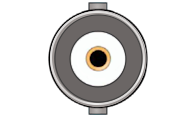 Anschluss an der KameraBNC
Sync (Genlock/Wordclock) Kabel PushPull-5-Pol (Lemo-kompatibel) auf BNC
Nur nötig, wenn du Genlock nutzt. Dafür brauchst du einen Lockit (ACN-CL), LockitBT (ACN-LB) oder Lockit+.
Im Shop ansehen