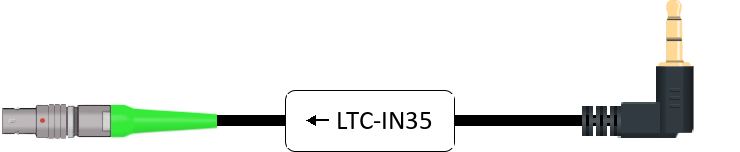
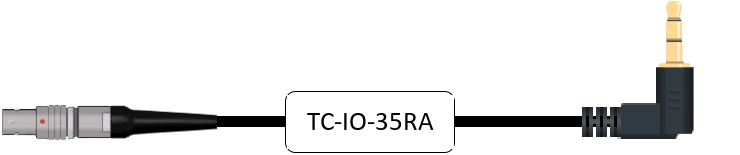
Timecode cable for Studio master clock or DAW interface with 3.5 mm jack output (TRS)

Matching Ambient cable for the Studio master clock or DAW interface with 3.5 mm jack output (TRS): TC-IO-35RA (output on the studio clock or DAW interface: 3.5 mm jack (TRS)) or LTC-IN35 (output on the studio clock or DAW interface: 3.5 mm jack (TRS)).

Studio clock or DAW interface → Lockit box (TX Mode)

In TX Mode your sound recorder, studio clock or DAW interface is the master: your Lockit box takes over its timecode and works as a bridge. This requires your device to output timecode on this port. Check its manual. How TX Mode works

Timecode (LTC)
TC-IO-35RA – NanoLockit Timecode Coiled Cable bi-directional
Output on the studio clock or DAW interface3.5 mm jack (TRS)
Port on the Ambient Lockit box5-pin port (Lemo-compatible)
Timecode (LTC)

TC-IO-35RA

NanoLockit Timecode Coiled Cable bi-directional

If LTC is on the ring of the jack

View in shop
or
LTC-IN35 – Timecode Cable 3,5 mm TRS to PushPull-5-pin (Lemo-compatible)
Output on the studio clock or DAW interface3.5 mm jack (TRS)
Port on the Ambient Lockit box5-pin port (Lemo-compatible)
Timecode (LTC)

LTC-IN35

Timecode Cable 3,5 mm TRS to PushPull-5-pin (Lemo-compatible)

If LTC is on the tip of the jack

View in shop

Depending on the port: pick one of the two cables.

Which port on your Lockit box?

CableLockitLockitBTLockit+NanoLockitLockitSlate
TC-IO-35RA (TX Mode)ACN port
Black sleeve
TC/DATA port
Black sleeve
ACN port, front left (blue marking)
Black sleeve
5-pin port on top
Black sleeve
5-pin port on the side of the display module
Black sleeve
LTC-IN35 (TX Mode)ACN port
Green sleeve
TC/DATA port
Green sleeve
ACN port, front left (blue marking)
Green sleeve
5-pin port on top
Green sleeve
5-pin port on the side of the display module
Green sleeve

Find another device